

Almost every guide on this topic gives you the same three-line summary: datacenter is fast and cheap, residential is trusted but pricey, mobile is the most trusted of all. That’s true, but it’s the conclusion — not the reasoning. If you’re spending real money on proxies, or building traffic and automation on top of them, you need to understand why those differences exist, because the “why” is exactly what detection systems are inspecting.
This article works from the network layer up. By the end you’ll understand where each proxy type physically comes from, what a receiving server actually sees when a request arrives, and how to match the right proxy type to the job instead of overpaying for trust you don’t need — or getting blocked because you cut a corner you shouldn’t have.
First principles: what a proxy actually changes
When your browser makes a request without a proxy, the destination server sees your real IP address. From that single IP it can immediately derive a surprising amount:
- The ASN (Autonomous System Number) that owns the IP block — e.g. an ISP like Comcast, a cloud host like AWS, or a mobile carrier like Vodafone.
- The rDNS / PTR record — the reverse-DNS hostname, which often reveals the host directly (
ec2-52-1-2-3.compute-1.amazonaws.comis not subtle). - Geolocation inferred from IP-to-geo databases (MaxMind, IP2Location, and the like).
- The IP’s reputation history — has this address sent spam, run scrapers, or triggered abuse reports before?
A proxy swaps your real IP for one of its own. Everything above is now derived from the proxy’s IP, not yours. The entire game of “residential vs mobile vs datacenter” comes down to one question:
How does the IP you’re borrowing look to the three systems above — ASN classification, rDNS, and reputation?
That’s the lens for everything that follows.
Datacenter proxies
Where they come from
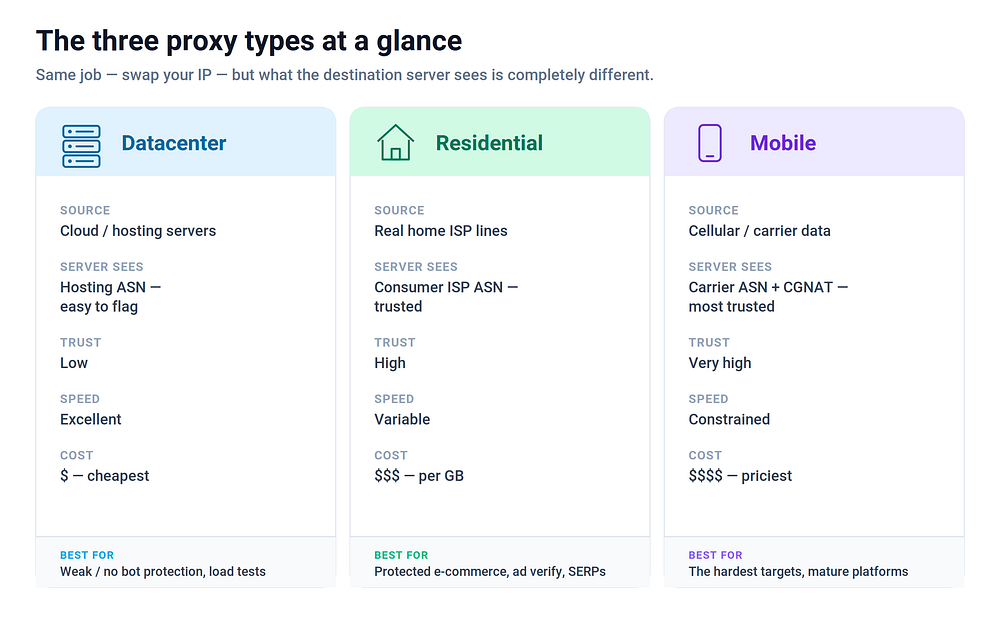
Datacenter IPs are allocated to hosting companies and cloud providers — AWS, Google Cloud, DigitalOcean, OVH, Hetzner, and thousands of smaller hosts. A proxy provider rents servers (or IP blocks) in these datacenters and routes your traffic through them. No consumer device or home connection is involved anywhere in the chain.
What the destination server sees
This is where datacenter proxies give themselves away. When a server resolves the ASN of a datacenter IP, it gets an organization clearly categorized as hosting/cloud infrastructure, not a consumer ISP. Public datasets (like the IP2Location or IPinfo “usage type” fields) label these blocks as DCH — datacenter/hosting. Any anti-bot system can buy or build the same classification.
In plain terms: a real human shopping for shoes is essentially never browsing from an AWS IP. So when a request to check out a cart arrives from an EC2 range, the site’s bot-management layer flags it instantly — regardless of how perfect your browser fingerprint is. The IP itself is the tell.
Subtypes worth knowing
- Shared datacenter — the same IP is used by many customers at once. Cheapest, and the most likely to already be burned (blocklisted) by the time you get it.
- Dedicated datacenter — the IP is yours alone. More expensive, but its reputation is entirely a product of your usage.
- ISP proxies (a.k.a. “static residential”) — a hybrid worth calling out. These are IPs that live physically in a datacenter but are registered to a consumer ISP’s ASN. To an ASN check they look residential; in latency and stability they behave like datacenter. They’re the sweet spot for tasks that need residential trust plus a stable, unchanging IP — but they’re pricier than plain datacenter and providers have limited supply.
Strengths
- Speed and stability. Datacenter connections have high bandwidth, low latency, and near-100% uptime. Nothing else on this list competes on raw performance.
- Cost. By far the cheapest per IP and per GB.
- Scale. You can spin up thousands of concurrent connections cheaply.
Weaknesses
- Easily classified. The ASN/usage-type flag is trivial to detect.
- Reputation contagion on shared pools — you inherit everyone else’s abuse.
- Subnet-level bans. Because datacenter IPs come in contiguous blocks, some sites block the entire subnet once one IP misbehaves. You can burn 256 addresses through the sins of one.
Best for
Scraping sites with weak or no bot protection, internal load testing, accessing your own infrastructure, SEO rank tracking on lenient targets, and any high-volume job where the destination doesn’t scrutinize IP type. If the target isn’t checking, there’s no reason to pay 20–50× more for residential.
Residential proxies
Where they come from
Residential IPs are the real addresses ISPs assign to home internet connections — the same kind of IP your own router has right now. A residential proxy provider routes your traffic through a real consumer device on a home connection, so the exit IP belongs to a legitimate ISP subscriber.
The important, and often uncomfortable, question is how providers get access to those devices. The honest answer for most large pools: SDKs. App developers embed a proxy provider’s SDK in a free app (a VPN, a wallpaper app, a game), the user agrees — often buried in a EULA — to share their idle bandwidth, and their device becomes an exit node. Some pools are sourced more transparently (paid opt-in “peer” programs); many are not. This matters both ethically and practically: consent-murky pools tend to be less stable and more likely to get whole ranges flagged as the sourcing gets discovered.
Takeaway: the sourcing model is a real quality-and-ethics differentiator between providers, not a footnote. Ask where the IPs come from before you buy.
What the destination server sees
An ISP ASN (Comcast, Spectrum, Deutsche Telekom, Jio…) and a usage type of residential/consumer. This is exactly what a genuine human visitor looks like, because it is a genuine human’s connection. The IP carries no cloud-hosting signal. This is the core of residential proxies’ trust: at the ASN and usage-type layer they are indistinguishable from real users, because they are real users’ addresses.
Rotating vs sticky sessions
- Rotating residential — you get a new exit IP on every request (or every few requests) out of a pool that may contain millions of addresses. Ideal for spreading a large scrape across many identities so no single IP shows suspicious volume.
- Sticky / session residential — you hold the same exit IP for a set duration (often up to ~10–30 minutes). Essential whenever a task spans multiple requests that must appear to come from one person: logging in, adding to cart, checking out, or any multi-step flow where a mid-session IP change would look absurd.
Strengths
- High trust at the network layer — passes ASN and usage-type checks that kill datacenter IPs.
- Massive geographic granularity — real IPs in specific countries, states, and often cities, drawn from actual ISP footprints.
- Resistant to blanket IP-type bans, because blocking “all residential” would mean blocking your real customers.
Weaknesses
- Cost. Priced per GB of bandwidth, and it’s expensive — orders of magnitude above datacenter. Heavy scraping gets pricey fast.
- Variable performance. You’re routing through someone’s home connection and a real device — expect higher and less predictable latency, and occasional dropped sessions when the host device goes offline.
- Reputation still isn’t guaranteed. “Residential” means the IP type is trusted; it doesn’t mean that specific IP hasn’t already been abused by another user of the same pool. Quality of the provider’s pool matters enormously.
Best for
E-commerce and travel scraping, sneaker/ticket and other protected checkouts, ad verification, accurate localized SERP checking, social media automation, and any target with serious bot management where a datacenter IP would be dead on arrival.
Mobile proxies
Where they come from
Mobile proxies route your traffic through devices connected to cellular networks (4G/LTE, 5G) — real phones and SIM-equipped devices/modems on carrier data. The exit IP is one assigned by a mobile carrier (Vodafone, AT&T, Airtel, and so on).
What the destination server sees — and the CGNAT superpower
Mobile carriers don’t hand every subscriber a unique public IP. They can’t — there aren’t enough IPv4 addresses. Instead they use Carrier-Grade NAT (CGNAT): thousands, sometimes tens of thousands, of real subscribers share a single public IP at any given moment, with the carrier translating between that shared public address and each device’s private one.
This single fact is why mobile proxies are the most trusted IP type available:
Blocking a mobile IP means blocking every real customer sitting behind that same carrier NAT. No serious site will do it.
When a request arrives from a mobile carrier ASN, the receiving server knows that the IP is shared by a crowd of legitimate humans. It literally cannot tell “the bot” apart from the hundreds of genuine users on the same address, and it can’t ban the address without collateral damage to real traffic. Volume-based rate limits that would nuke a datacenter IP are also far more forgiving here, precisely because high traffic from a mobile IP is expected.
On top of that, carriers rotate and reassign these IPs constantly as devices reconnect — so a mobile IP’s history is naturally noisy and short-lived, which further muddies any reputation scoring.
Strengths
- The highest trust of any proxy type, thanks to CGNAT and carrier ASN classification.
- Extremely resistant to bans and aggressive rate limits.
- Naturally clean reputation, because IPs churn among many real users.
Weaknesses
- The most expensive option, usually priced per device/port or with tight bandwidth caps.
- Bandwidth and speed constraints inherited from the cellular link — fine for realistic browsing, not for bulk data transfer.
- Smaller, less granular pools. You typically choose a country and carrier, not a precise city, and the number of distinct exit IPs is far smaller than a residential pool.
Best for
The hardest targets: mature social platforms, aggressive ad networks, account management on sites with heavy anti-automation, and anything where you’ve already been detected on residential IPs. It’s the “when nothing else gets through” tier — you pay for it, so reserve it for jobs that need it.
The mistake almost everyone makes: it’s never only the IP
Here’s the trap. People buy premium mobile proxies, point a poorly-configured browser at them, and still get blocked — then blame the proxies. The IP is one signal among many, and modern bot management fuses them all:
- Network layer — the IP’s ASN, usage type, and reputation. This is what proxy type controls.
- TLS / HTTP layer — the TLS handshake (JA3/JA4 fingerprint) and HTTP/2 frame ordering. A mismatch between a “Chrome on Android” user-agent and a TLS fingerprint that doesn’t match any real Chrome is a dead giveaway, no matter how good the IP is.
- Browser fingerprint — user-agent, WebGL renderer, canvas hash, audio-context fingerprint, installed fonts, screen metrics, WebRTC-exposed IPs,
navigatorproperties. FingerprintJS and CreepJS live here. - Behavior — mouse movement, scroll depth, dwell time, and whether the request pattern looks human or robotic.
Consistency across all four layers is the actual objective. A mobile IP is worthless if your browser leaks your real IP over WebRTC, or reports a desktop GPU while claiming to be a phone, or exhibits a timezone and Accept-Language header that don’t match the IP’s country. Detection systems don’t hunt for one bad signal — they hunt for contradictions between signals.
That’s why the two details that trip people up most often are:
- Timezone / locale alignment. If your exit IP is in Los Angeles but the browser reports
Europe/Berlinandde-DE, that contradiction alone is enough to flag the session. The browser’s timezone, language headers, and the IP’s geolocation all have to tell one coherent story. - WebRTC leaks. WebRTC can expose your real IP directly to the page via STUN, sailing straight past the proxy. A flawless mobile proxy plus a WebRTC leak equals a blown session.
This is exactly the layer where a purpose-built traffic tool earns its keep. OverRider is designed around this consistency problem rather than treating the proxy as a magic bullet:
- Its built-in proxy engine continuously scrapes, tests, and auto-selects working proxies by type, speed, and reputation — so you’re not shipping requests through dead or already-burned IPs.
- Smart proxy + timezone matching automatically aligns each session’s browser language and timezone (down to daylight-saving-aware offsets) with the exit IP’s country — closing the single most common contradiction above.
- The anti-detection layer — WebGL and canvas randomization, audio-context noise, plugin/hardware spoofing, and WebRTC leak protection — keeps the fingerprint internally consistent and stops the real-IP leak that undoes an otherwise-clean session.
The proxy chooses how trusted your address is. The rest of the stack decides whether the rest of your session backs that story up.
A decision framework
Skip the “which is best” framing — there is no best, only best-for-the-job. Ask these in order:
- Does the target actually inspect IP type? Test with cheap datacenter IPs first. If they work, stop — you’ve just saved 20–50× on cost. Plenty of scraping and rank-tracking targets don’t check.
- Do you need to look like an organic, local human visitor? If yes (ad verification, localized SERPs, e-commerce, realistic marketing traffic), you need residential at minimum. Match the geography to your real target audience.
- Is the target aggressively anti-bot, or are you already getting blocked on residential? Step up to mobile. Its CGNAT shield is the strongest ban resistance available — but you’re paying for it, so don’t reach for it before you need it.
- Does the task span multiple linked requests as one identity? Login → cart → checkout, or any session flow, needs sticky/session IPs (residential or mobile). Rotating IPs mid-session will torch it.
- Whatever you pick — is the rest of your session consistent with it? Timezone, locale, TLS and browser fingerprint, and no WebRTC leak. This is where most “the proxy didn’t work” failures actually live.
The bottom line
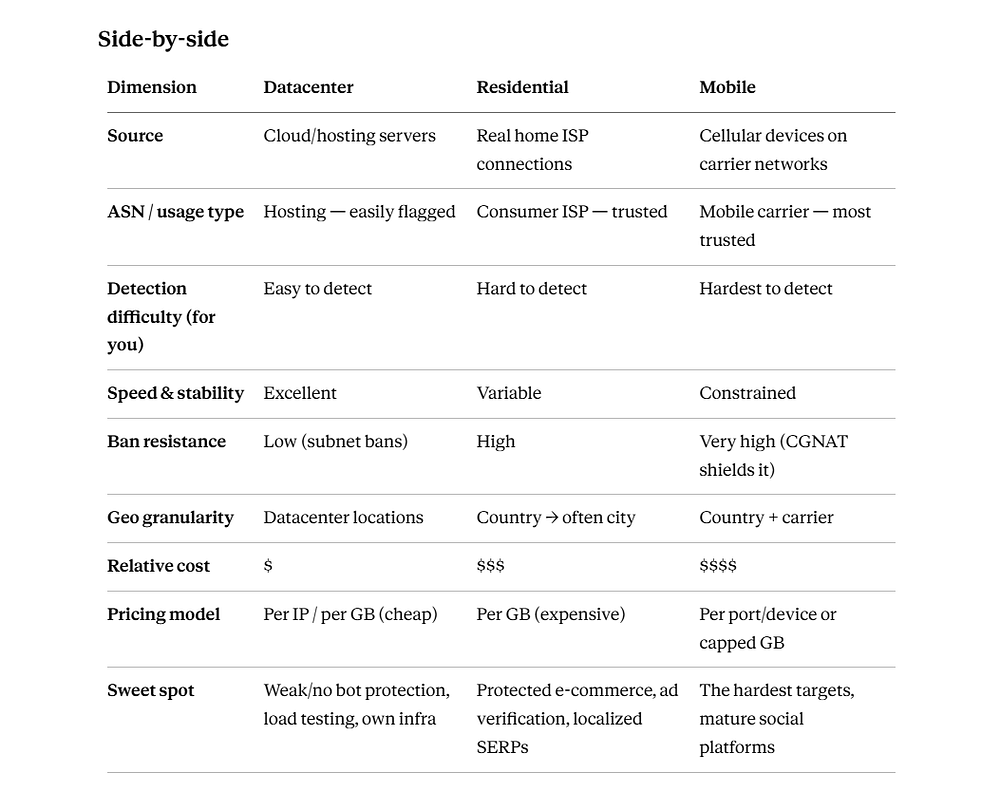
- Datacenter trades trust for speed and price. Perfect when the target isn’t checking; useless when it is.
- Residential buys network-layer trust by borrowing real ISP IPs — the default for anything facing serious bot management, at a real cost premium and with variable performance.
- Mobile is the trust ceiling, defended by CGNAT that makes bans self-harming for the site — the option for the hardest targets, at the highest price.
But the proxy is only the address on the envelope. What’s inside — your TLS handshake, browser fingerprint, timezone, locale, and behavior — has to match that address, or the best IP money can buy still gets you blocked. Choose the proxy type for the job, then make sure every other layer tells the same story. That consistency, not the proxy alone, is what actually gets you through.