

Pre-Setup: What You Need Before Starting
System Requirements Check:
- Operating System: Windows 10 or later (64-bit)
- RAM: 4GB minimum (8GB recommended for high-volume campaigns)
- Storage: 2GB available space for installation and logs
- Internet: Stable broadband connection (10+ Mbps recommended)
Essential Preparation:
- Target URLs: List of pages you want to send traffic to
- Analytics Setup: Ensure Google Analytics or your tracking platform is properly configured for target URLs
- Success Metrics: Identify key performance indicators to monitor
Step 1: OverRider Installation and Initial Setup
Download and Install:
- Download OverRider from link provided
- Run the installer by double-clicking the setup file
- License Activation: Enter your license key from the purchase email(No license required for trial evaluation)
- First Launch: OverRider will perform initial setup and browser engine download
Initial Configuration:
- Default Browser Engine: Select Engine-2 for maximum compatibility (recommended)
- Thread Configuration: Start with 10 concurrent threads
- Update Check: Ensure you have the latest version
Step 2: Campaign Configuration
Basic Campaign Settings:
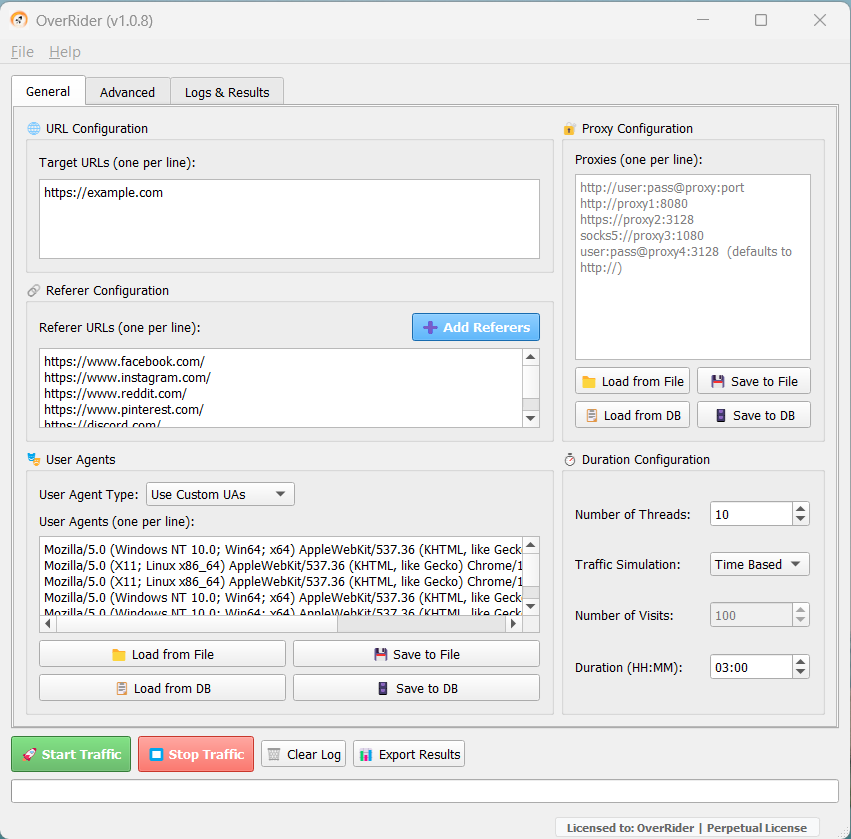
Target URL Configuration:
Primary URL: https://yourwebsite.com/landing-page3
Secondary URLs(Optional):
- https://yourwebsite.com/page-1
- https://yourwebsite.com/page-2
- https://yourwebsite.com/page-
Referrer Configuration:
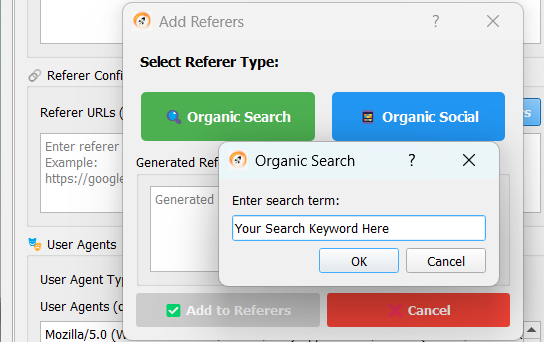
- Organic Search: Enter your keyword if you want to simulate traffic from search engines like google, bing, yahoo, ask etc. You may add multiple keywords one by one.
- Organic Social: Press button Organic Social if you want to simulate traffic from social media websites like facebook, instagram, reddit, quora etc.
- Own Custom Referers: You may add your own referers just by typing in Referer URLs field
User Agent Management:
- Use System Default/Use Custom UAs: You may use system default user agents or use your own custom UAs if you want
Traffic Volume Settings:
- Visits Count/Time Duration: Either enter number of visits or duration of OverRider traffic simulation
- Thread Count: 10-30 threads (adjust based on your system capacity)
Proxy Configuration:
- Proxy Type: HTTP/HTTPS for standard web traffic
- Geographic Matching: Ensure proxy locations match your target regions
- Quality Filtering: Use only high-speed, anonymous proxies
Advance Campaign Setting
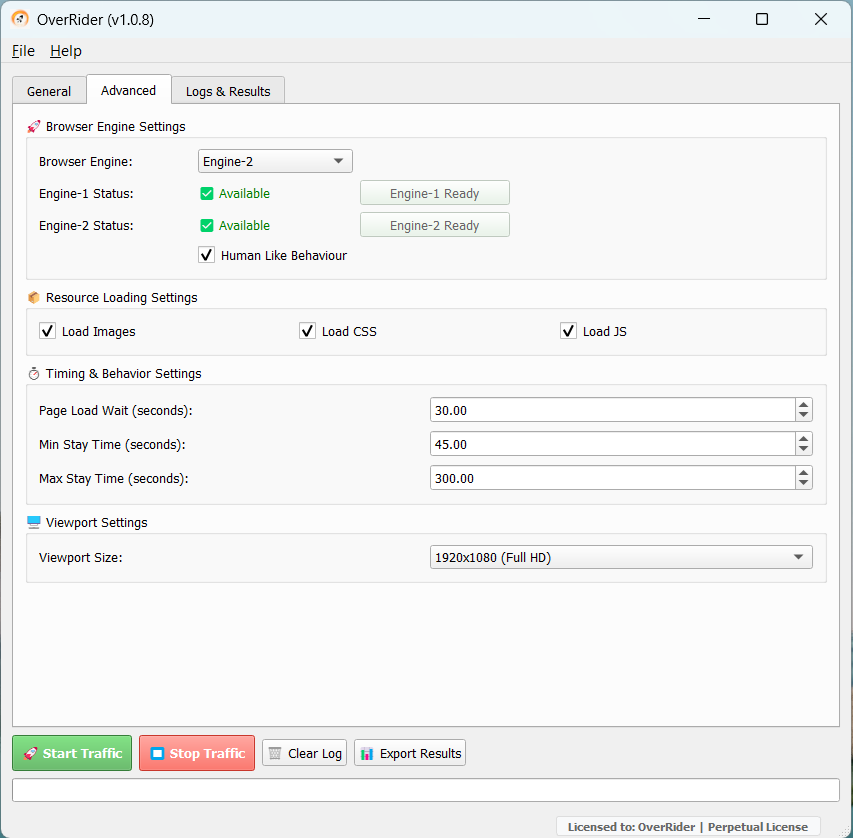
Browser Engine Setting:
- Browser Engine Selection: Choose between engine-1 and engine-2. If you are not sure about it use engine-2
- Human Like Behaviour: Always select human like behaviour if you want natural scrolling, human-like cursor patterns simulation
Timing & Behaviiour Setting:
- Page Load Wait(in Seconds): System try to establish a connection within this specified duration
- Min Stay Time(in Seconds): Simulate a user visit for atleast this much duration
- Max Stay Time(in Seconds): Simulate a user visit for atmost this much duration
Step 3: Campaign Execution and Optimization
Pre-Launch Checklist:
- Target URLs are accessible and loading properly
- Proxy connections are stable (if using)
- Server resources can handle planned traffic volume
Launch Process:
- Start Small: Begin with 100 visitors to test all systems
- Monitor Real-Time: Watch analytics for proper tracking
- Verify Quality: Check succes rates and session durations match expectations
- Scale Gradually: Increase volume after confirming everything works correctly
Real-Time Optimization:
- Thread Adjustment: Increase/decrease based on server response times
- Advanced Tab Setting: Use default setting if you don’t fully understand it
- User Agents: Use system default for better results
Troubleshooting Common Setup Issues
Campaign Not Starting:
- Network Connectivity: Check internet connection and firewall settings
- Resource Availability: Verify sufficient system resources (RAM, CPU)
- Previous Campaign Status: Check if previous campaign is still running. If you manually stop a campaign, it takes few minutes to stop the campaign as many requests may be in running state
- URL Accessibility: Confirm target website(s) are responding normally
Low Success Rates:
- Server Capacity: Target website may be overwhelmed
- Proxy Quality: Use higher-quality proxy IPs
- Thread Reduction: Decrease concurrent connections(Number of Threds)
- Increase Stay Time: Increase min/max stay time duration