
Public vs private proxies
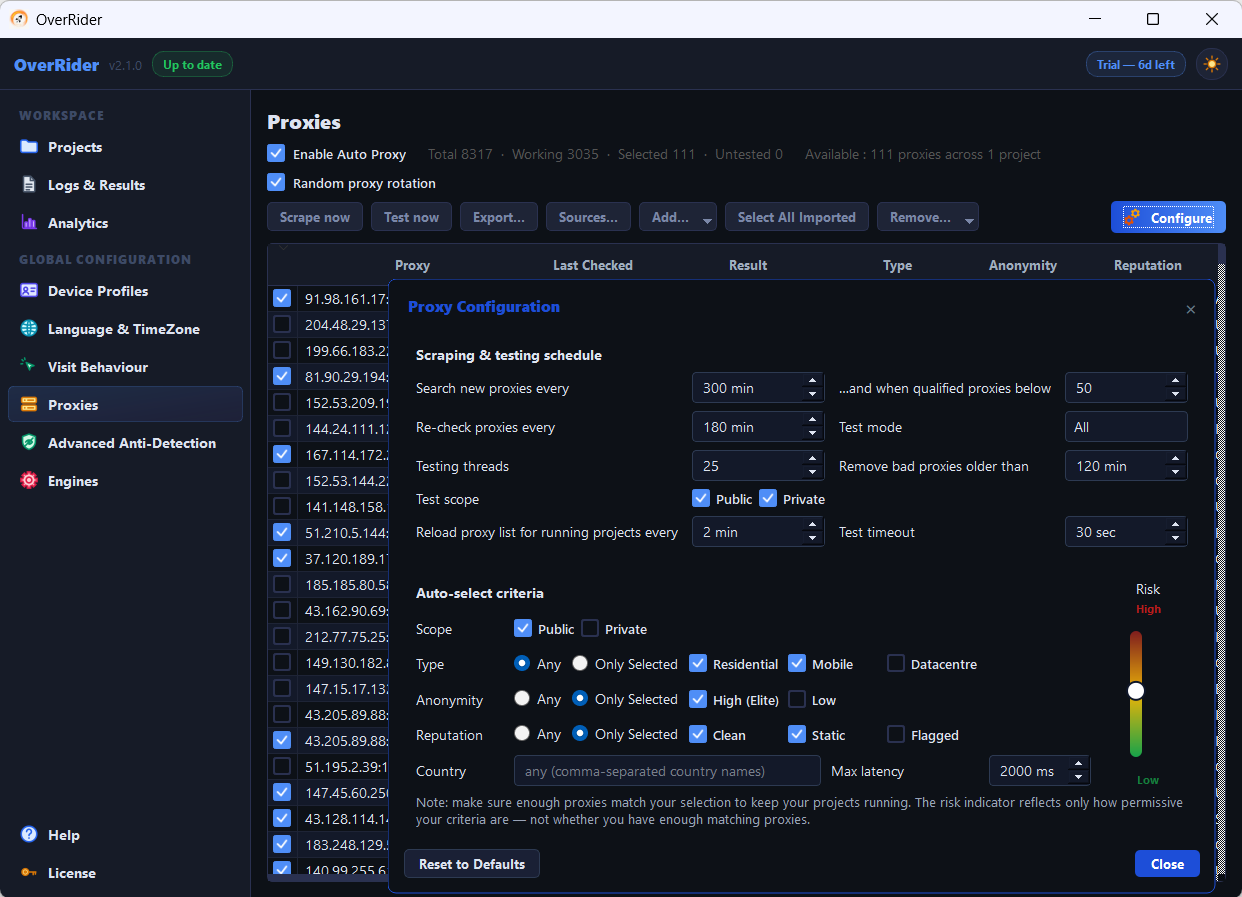
Public proxies are free, scraped automatically, and typically achieve a 20 to 40 percent success rate. Private proxies are ones you pay for and add yourself, with a username and password, and are far more reliable. The auto-select scope defaults to Public only, so private proxies are ignored until you tick Private.
OverRider classifies every proxy as either Public or Private. The distinction affects reliability, and it affects which proxies auto-selection is allowed to use.
The difference
| Public | Private | |
|---|---|---|
| Where they come from | Scraped automatically from about 20 free sources | You add them yourself |
| Authentication | None | Username and password |
| Cost | Free | Paid, from a provider |
| Typical success rate | 20 to 40 percent | Over 90 percent |
| Lifespan | Minutes to hours | As long as your subscription |
| IP reputation | Usually data centre, often on bot lists | Residential options carry normal reputation |
Why public proxies fail so much
A free public proxy is a machine somewhere running an open proxy, often unintentionally. Nobody maintains it and nobody guarantees it. One that tested fine twenty minutes ago may be gone now.
Beyond dying, they carry a second problem: they overwhelmingly live in data-centre IP ranges that appear on industry bot lists. Analytics platforms, Google Analytics included, filter those ranges automatically. So a visit can succeed from OverRider’s point of view and still never appear in your reports.
The scope setting that catches people out
Under Proxy Configuration → Auto-select criteria, the Scope setting defaults to Public only. If you have paid for private proxies and added them, auto-selection will still ignore them entirely until you tick Private.
This is the most common reason someone reports “I bought proxies and nothing changed”. Two ways to fix it:
- Add Private to the auto-select scope, so your paid proxies qualify; or
- Tick them manually in the proxy table. Manually ticked proxies are always used, regardless of scope or any other criterion.
Test scope is separate
There are two scope settings and they do different jobs:
- Test scope — which proxies the background tester checks. Both types can be ticked.
- Auto-select scope — which proxies auto-selection may choose for traffic.
Testing a proxy does not mean it will be used. Both must include the type you care about.
Residential vs data centre
Among paid proxies there is a further split. Data-centre proxies are cheaper and faster but share the reputation problem described above. Residential proxies route through real consumer connections, so they are treated as ordinary visitors.
For analytics work, residential is worth the extra cost — a fast proxy whose traffic gets filtered out is worth nothing.
Mixing both
You can run both types at once. A reasonable setup is private proxies for reliability with public ones in scope as overflow. Be aware this makes your success rate an average of the two, and it becomes harder to tell which type a failure came from.
While diagnosing a problem, use one type at a time.
Last updated: