
Set up organic search traffic
Open Traffic Sources from the Target URLs card, enter your keywords one per line, tick the search engines you want, and check the preview. Each keyword is combined with each engine to build a search results URL, one of which becomes the referrer for each visit.
1. Open Traffic Sources
Select your project and click Traffic Sources in the header of the Target URLs card.
2. Enter keywords
Type your keywords into the Organic Search box, one per line. Use the phrases a real visitor would search — they appear in the referrer URL, and in some analytics views you will see them.
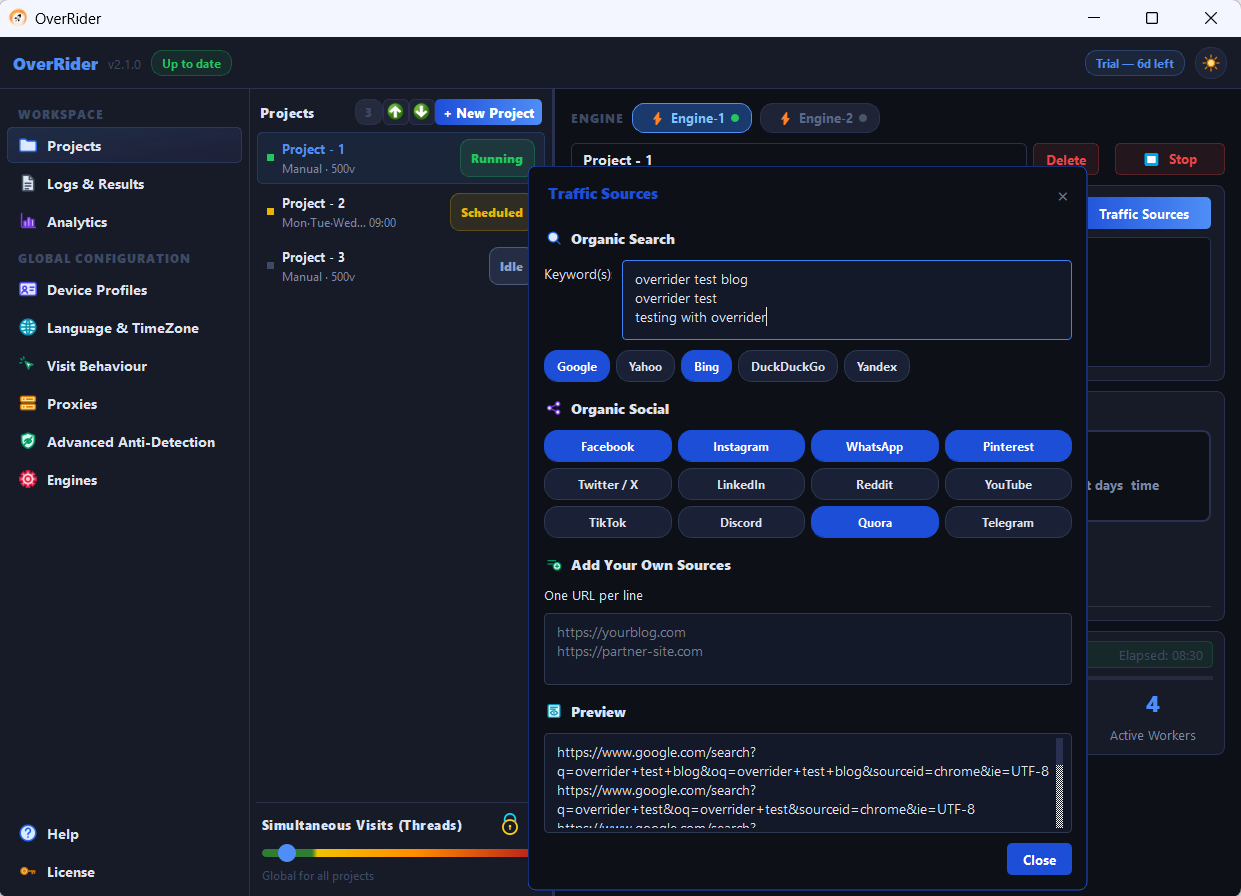
3. Pick your search engines
Tick the engines you want. Five are available:
| Engine | Worth including when |
|---|---|
| Almost always — it dominates real referral traffic | |
| Bing | Your audience is on Windows or in a corporate environment |
| Yahoo | You want a small share of variety |
| DuckDuckGo | Your audience is privacy-conscious |
| Yandex | You are targeting Russian-speaking regions |
A realistic mix is mostly Google with a little Bing. Ticking all five in equal measure produces a referrer spread that no real site has.
4. Check the preview
The dialog previews every referrer URL your settings will generate. Keywords multiply by engines — 5 keywords across 3 engines gives 15 URLs.
Read the preview before starting a long run. A typo is far easier to catch here than in your analytics tomorrow.
5. Save and start
Save the dialog and start the project. Each visit picks one referrer URL at random, loads it, waits 15 to 60 seconds, then goes to your target page.
How many keywords?
Between 5 and 20 is a sensible range. Too few and every visit carries the same handful of referrers; too many and each one gets so little traffic that the data is not useful.
What this does not do
This is not a search-ranking tool, and any effect on rankings is not guaranteed. The browser loads a search results page as a referrer — it does not perform a search, locate your listing, or click through to it. The direct effect is only on how your own analytics labels the session.
Nor does it tie keywords to pages. Target URLs and referrers are chosen independently per visit, so any keyword can appear with any landing page. If you need specific pairings, create one project per pair.
Expect some keyword data to be hidden
Google has withheld search terms from analytics for years, reporting them as (not provided). You will usually see the session attributed to google / organic without the keyword. That is normal and is not a fault in OverRider.
Longer visits
Every visit now loads two pages instead of one, adding 15 to 60 seconds. Your visits-per-hour rate drops accordingly — factor that in when you calibrate a run.
If referrer pages fail
Search engines rate-limit heavily, and free proxies are often already blocked by them. If the log shows failures on the referrer step, try fewer threads, better proxies, or a mix that leans less on one engine.
A failed referrer fails the whole visit and it is retried with a different proxy, so it is not silently counted as a success.
Last updated: