
Restrict traffic to a specific country
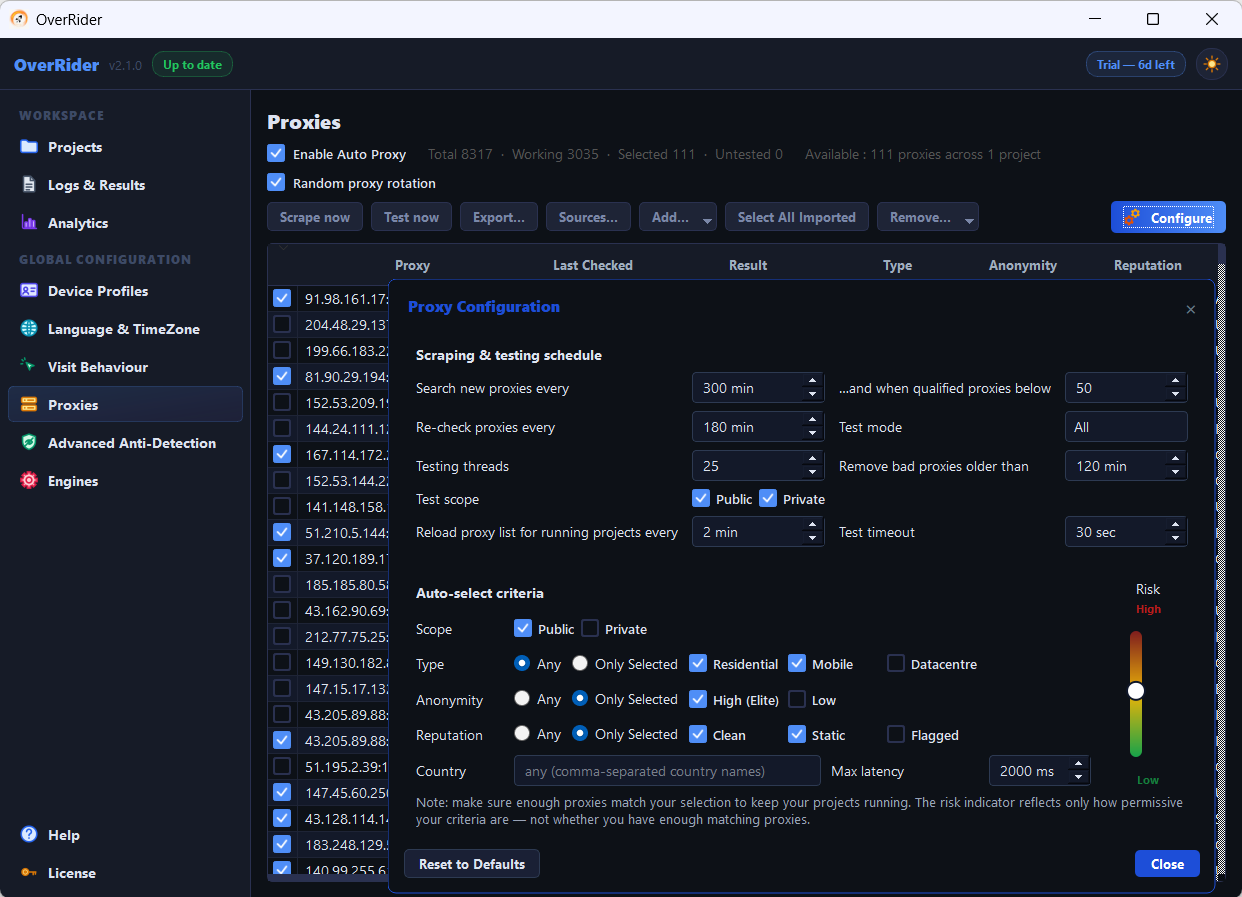
Set the country filter in Proxy Configuration under Auto-select criteria. Analytics platforms determine geography from the IP address, so the proxy exit country is the only thing that controls reported location. Language and timezone settings do not affect it.
Reported geography comes from one place only: the IP address the visit arrives from. In OverRider that means the proxy’s exit country. Everything else is cosmetic.
The steps
- Open the Proxies panel and click Configure.
- Find Auto-select criteria.
- In the Country field, choose the countries you want.
- Check the qualifying proxy count before saving.
Only proxies whose tested exit country matches will now be auto-selected.
The common mistake
Setting the language and timezone to a country does not make your analytics report that country. Those settings change what the browser claims about itself. Google determines location from the IP address and ignores the claim entirely.
Language settings are worth adjusting as well, so the visit is internally consistent — but they are not what produces the country in your reports.
Match the language too
Once your proxies are country-filtered, enable Match language & timezone to the proxy’s IP location in the Language and Timezone panel. Each visit then reports a language and timezone appropriate to where it is actually coming from.
Without it you can end up with German IP addresses reporting American English and a New York timezone — an inconsistency that is more conspicuous than either value alone. See Language and timezone geo-matching.
Country filtering needs enough proxies
This is where the approach usually runs into trouble. Free proxies are not evenly distributed — some countries have hundreds available, others a handful, some none at all.
After setting the filter, check the qualifying count:
| Qualifying proxies | What to expect |
|---|---|
| Fewer than your thread count | Projects stall or reuse the same few addresses constantly |
| Roughly 2× your thread count | Workable minimum |
| 20 or more | Comfortable |
If a country has too few free proxies, buy residential proxies for that country. Most providers let you choose the exit location, and it is the only dependable way to target a specific market.
Verify it worked
Start a short project and open Reports → Realtime in Google Analytics. The country shown should be your target, not yours.
If it still shows your own country, the visits are not going through a proxy at all. Check that proxies are enabled, that some qualify under your criteria, and that any credentials with special characters are percent-encoded.
Targeting a city or region
OverRider filters by country only. For city-level targeting you need a proxy provider that offers city selection, and you add those proxies yourself and tick them manually.
Multiple countries
You can select several countries at once, and proxies are then drawn from all of them. If you want a controlled split — say 70 percent one country, 30 percent another — that is not something the filter can express. Run separate projects with different proxy selections instead.
Last updated: