
Language and timezone geo-matching
Geo-matching derives the browser language and timezone from the country the proxy exits in, so the two agree. It is off by default. It does not change the country your analytics reports, which comes from the IP address alone.
Each device profile carries its own language and timezone. On its own that is fine, until you route the visit through a proxy in a different country — then the browser claims to be in Germany while connecting from Brazil.
Geo-matching fixes that contradiction by deriving the language and timezone from where the proxy actually exits.
What it does
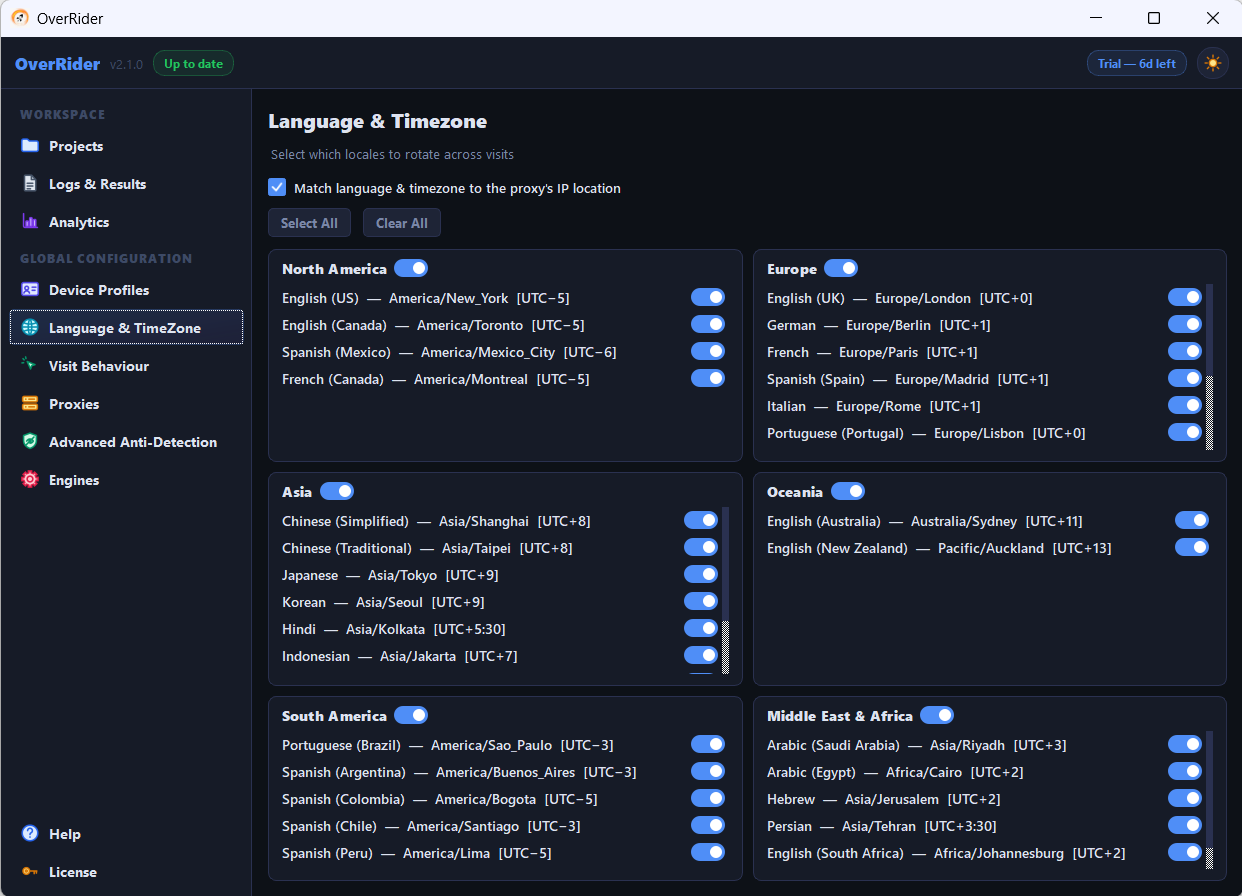
When Match language & timezone to the proxy’s IP location is enabled, OverRider looks up the exit country of the proxy chosen for a visit, then overrides the profile’s values with ones appropriate to that country:
- The
Accept-Languageheader andnavigator.language - The browser timezone, including correct daylight saving behaviour
A proxy exiting in France produces a French-language, Europe/Paris browser. The same visit through a Japanese proxy produces a Japanese-language, Asia/Tokyo one.
What it does not do
It does not change the country your analytics reports. Google Analytics, Shopify and every similar platform determine geography from the IP address. Setting a browser to French does not make GA4 say France.
If your goal is traffic that reports as coming from a particular country, the setting you need is the country filter in the proxy auto-select criteria. That controls which proxies are used, and therefore which IP addresses your visits come from. See Restrict traffic to a specific country.
Geo-matching is about internal consistency, not about reported geography.
When to turn it on
Turn it on when you are using proxies from several countries and want each visit to look coherent. A browser whose language, timezone and IP all agree is less anomalous than one where they contradict each other.
Leave it off when you are not using proxies at all, or when you deliberately want to test how your site handles a specific language regardless of connection origin — for example checking that a German-language visitor on an American IP still sees the right content.
How regions interact with it
The region checkboxes above the toggle control which languages the profile pool draws from — North America is enabled by default, the rest are not.
When geo-matching is on, it overrides those values for any visit where the proxy country is known. The region selection still matters for visits without a proxy, or where the country could not be determined.
If you enable geo-matching, consider widening your region selection too. Otherwise your non-proxied visits all report North American languages while your proxied ones vary, which is its own inconsistency.
When the country cannot be determined
If the exit country of a proxy is unknown, the visit falls back to the device profile’s own language and timezone. Nothing fails; the visit just does not get the geo-matched values.
Related settings
Two fingerprint overrides interact with this. Timezone DST makes daylight saving behave correctly for whichever timezone is applied, and WebRTC prevents a page reading your real IP address behind the proxy. Both are on by default and both should stay on when using proxies.
Last updated: