
Configure the auto proxy engine
Enable Auto Proxy, then set how often new proxies are scraped, how often existing ones are retested, and which ones qualify for use. Scraping runs only when both the interval has elapsed and the qualified count is below your threshold, so both conditions matter.
The auto proxy engine keeps a pool of working free proxies topped up without you touching it. It scrapes, tests, classifies and selects.
Turn it on
Tick Enable Auto Proxy in the Proxies panel. Scraping and testing then run in the background on the schedule you configure.
Open the configuration
Click Configure to open the scheduling and auto-select dialog.
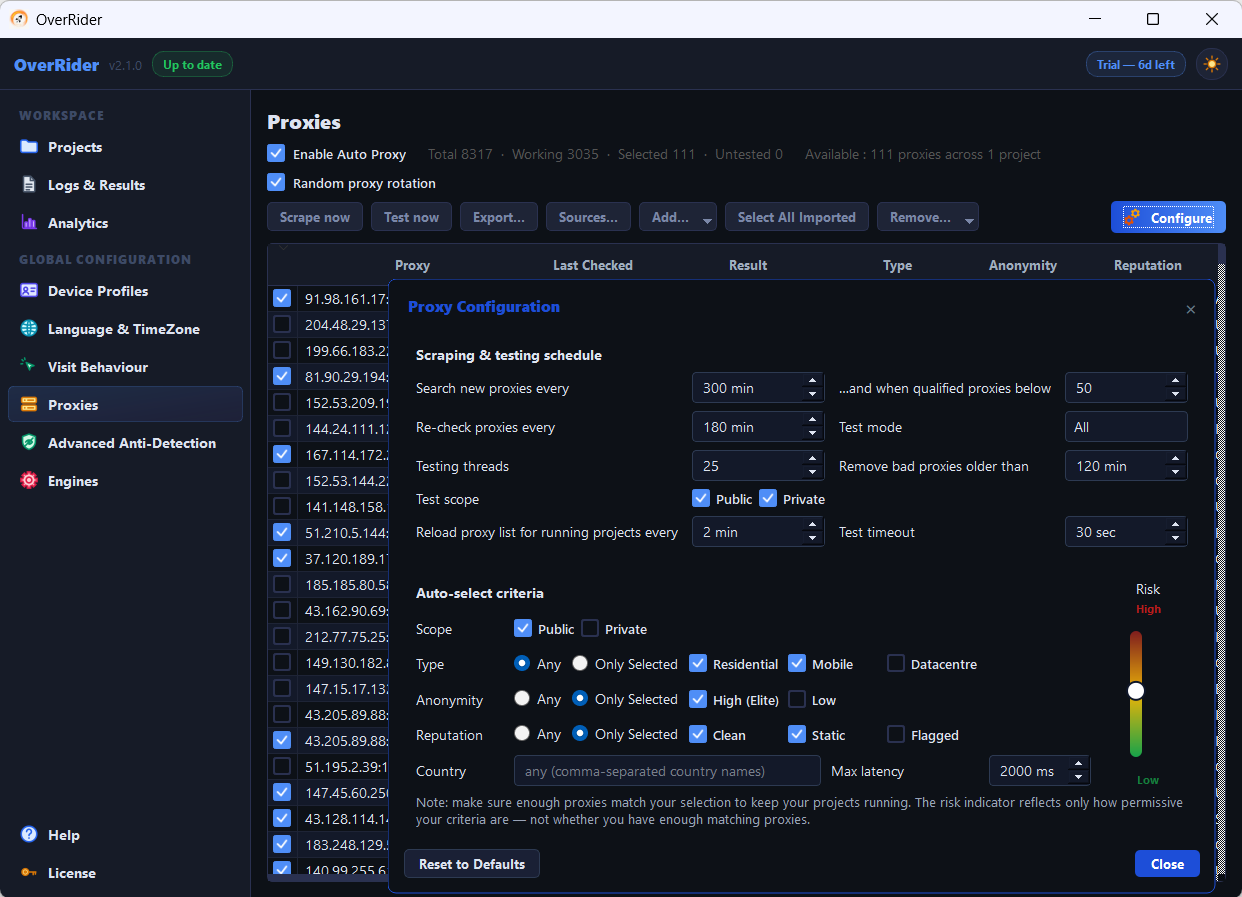
Scheduling
| Setting | What it does | Suggested |
|---|---|---|
| Search new proxies every | How often to scrape the sources for new proxies | 30 to 60 minutes |
| …and when qualified proxies below | The pool size below which scraping is allowed to run | Around twice your thread count |
| Re-check proxies every | How long a test result stays valid before retesting | 30 to 60 minutes |
| Reload proxy list for running projects every | How often running projects pick up pool changes | Leave at the default |
The first two settings form an AND condition. Scraping runs only when the interval has elapsed and the qualified count is below the threshold. Set the threshold too low and scraping never triggers, even as your pool dies off.
Why the re-check interval matters most
Free proxies die constantly. This setting decides how long OverRider keeps trusting a stale test result. Set it to several hours and you will keep handing dead proxies to your projects, which shows up as failed visits.
Thirty to sixty minutes is a good balance. Shorter means a fresher pool at the cost of more background testing.
Test scope
Choose whether the background tester checks Public proxies, Private ones, or both. Both can be ticked at once. Testing is what discovers whether a proxy works and which country it exits in.
Auto-select criteria
These decide which tested proxies actually qualify for traffic.
| Criterion | Notes |
|---|---|
| Scope | Defaults to Public only. Add Private or your paid proxies are never auto-selected. |
| Country | Restricts to proxies exiting in chosen countries. This is what controls reported geography. |
| Protocol | HTTP, HTTPS, SOCKS4, SOCKS5, or Any |
| Anonymity | How much the proxy reveals about the original client |
| Speed | Filters out slow proxies, which otherwise cause page load timeouts |
Proxies you tick yourself are never affected by these criteria, in or out of scope. Manual selection always wins.
The risk indicator
The dialog shows a risk meter summarising your criteria. Loose criteria give you a large pool of mixed quality; tight criteria give a small, reliable pool that may be too small to sustain your thread count.
Watch the qualifying count as you adjust. If it falls to single digits, relax something — you are about to starve your projects.
Reset to defaults
The dialog has a reset button that restores every scheduling and auto-select value. Useful if you have tightened criteria to the point where nothing qualifies and you have lost track of what you changed.
A sensible starting configuration
- Enable Auto Proxy: on
- Search new proxies every: 45 minutes, threshold around twice your thread count
- Re-check proxies every: 45 minutes
- Test scope: both
- Auto-select scope: Public and Private
- Country, protocol, anonymity: Any to begin with; tighten only when you have a reason
Last updated: